
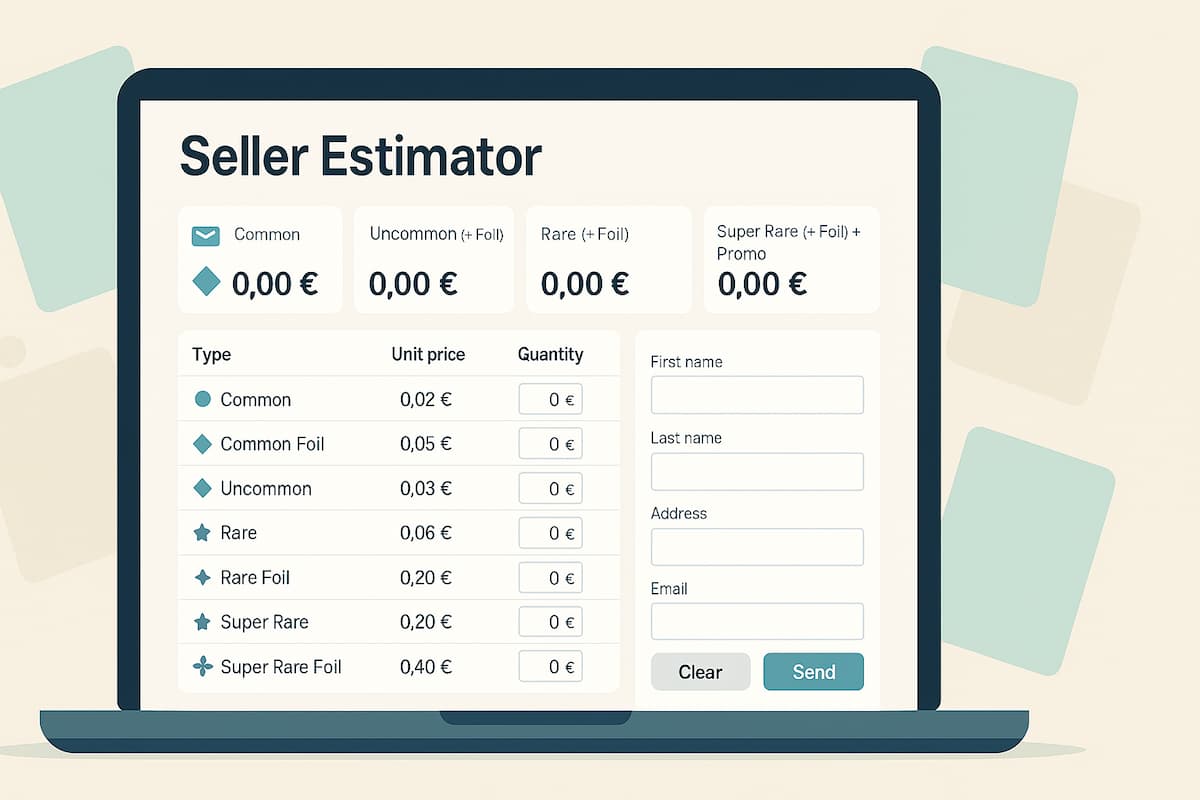
If you’re looking to turn your Disney Lorcana bulk into cash without spreadsheet headaches, the Seller Estimator on Lorcana Investor streamlines the whole process. You simply enter how many cards you have in each rarity (including Foils), and the page calculates per-type totals and a grand total in euros—live, as you type. Add your contact details and click Send to email your estimate. The page states you’ll receive a response within 24–48 hours.
What the tool shows at a glance
At the top, you’ll see four big summary tiles that auto-update:
- Common (+ Foil)
- Uncommon (+ Foil)
- Rare (+ Foil)
- Super Rare (+ Foil) + Promo
Beneath them, a bold Grand total tile adds everything together so you always know the overall value of your bulk submission.
The pricing table (fixed unit prices)
Each line has a Type, the Unit price, a Quantity box for you to fill in, and a line Total that updates automatically.
- Common — 0,02 €
- Common Foil — 0,05 €
- Uncommon — 0,03 €
- Uncommon Foil — 0,05 €
- Rare — 0,06 €
- Rare Foil — 0,20 €
- Super Rare — 0,20 €
- Super Rare Foil — 0,40 €
- Promo — 1,00 €
Tip: decimal values use a comma (,) and all amounts are shown in €.
There are also two buttons at the bottom of the table:
- Clear — resets all quantities to zero.
- Send — emails your estimate to Lorcana Investor.
Step-by-step: from card pile to estimate
- Scan your collection by rarity. You don’t enter card names—only how many you have in each rarity and foil variant.
- Type quantities in the Quantity column (e.g., “120” Commons, “8” Common Foils, etc.).
- Watch the numbers update. Each row’s Total and the four category tiles refresh instantly.
- Review the grand total in euros at the top.
- Fill your contact details in the fields provided: First name, Last name, Address (“Street, number, city, ZIP, country”), Email, and Phone.
- Click Send. Your estimate is emailed for review; the page notes a response time of 24–48 hours.
Worked example (so you can see the math)
Imagine you enter the following quantities:
Common band
- Common: 120 × 0,02 € = 2,40 €
- Common Foil: 8 × 0,05 € = 0,40 €
Tile total (Common + Foil) = 2,80 €
Uncommon band
- Uncommon: 90 × 0,03 € = 2,70 €
- Uncommon Foil: 6 × 0,05 € = 0,30 €
Tile total (Uncommon + Foil) = 3,00 €
Rare band
- Rare: 40 × 0,06 € = 2,40 €
- Rare Foil: 12 × 0,20 € = 2,40 €
Tile total (Rare + Foil) = 4,80 €
Top tier + promos
- Super Rare: 10 × 0,20 € = 2,00 €
- Super Rare Foil: 3 × 0,40 € = 1,20 €
- Promo: 2 × 1,00 € = 2,00 €
Tile total (Super Rare + Foil + Promo) = 5,20 €
Grand total = 2,80 € + 3,00 € + 4,80 € + 5,20 € = 15,80 €
Everything above updates automatically as soon as you type your quantities.
Field-by-field overview
- First name / Last name — your contact name for the reply.
- Address — full mailing address (the placeholder shows “Street, number, city, ZIP, country”).
- Email — where the estimate confirmation goes.
- Phone — optional contact number field is visible on the form.
- Clear / Send — reset or email your estimate in one click.
Practical tips for accurate submissions
- Count Foils separately. Foil lines have their own unit prices; they’re not bundled into the non-foil rows.
- Use the table quantities only. Unit prices are fixed on the page—you just supply counts.
- Double-check commas and digits. Values are in euros, using comma decimals (e.g., “0,05 €”).
- Sanity-check the tiles. The four summary tiles help you spot input mistakes quickly (e.g., if a foil total looks too high/low).
Why this helps sellers
- Instant clarity: No spreadsheets—just enter quantities and see the totals.
- Transparent rates: Fixed per-rarity prices are visible up front.
- Fast next step: Add your details and click Send to share the estimate, with a stated reply window of 24–48 hours.
That’s the whole flow: count your cards by rarity (including foils), enter the quantities, confirm the live totals and Grand total, complete your contact info, and Send. The Seller Estimator handles the math and packages your submission so you can get a prompt response.